Find the ideal TV size for your seating distance and wall.
Enter your viewing distance and wall width, choose a resolution and how you watch, and get an instant screen size recommendation — using the same distance ratios home theater installers rely on. No guesswork, no eye-strain from sitting too close, and no TV that overwhelms the wall.
Standard TV size by viewing distance.
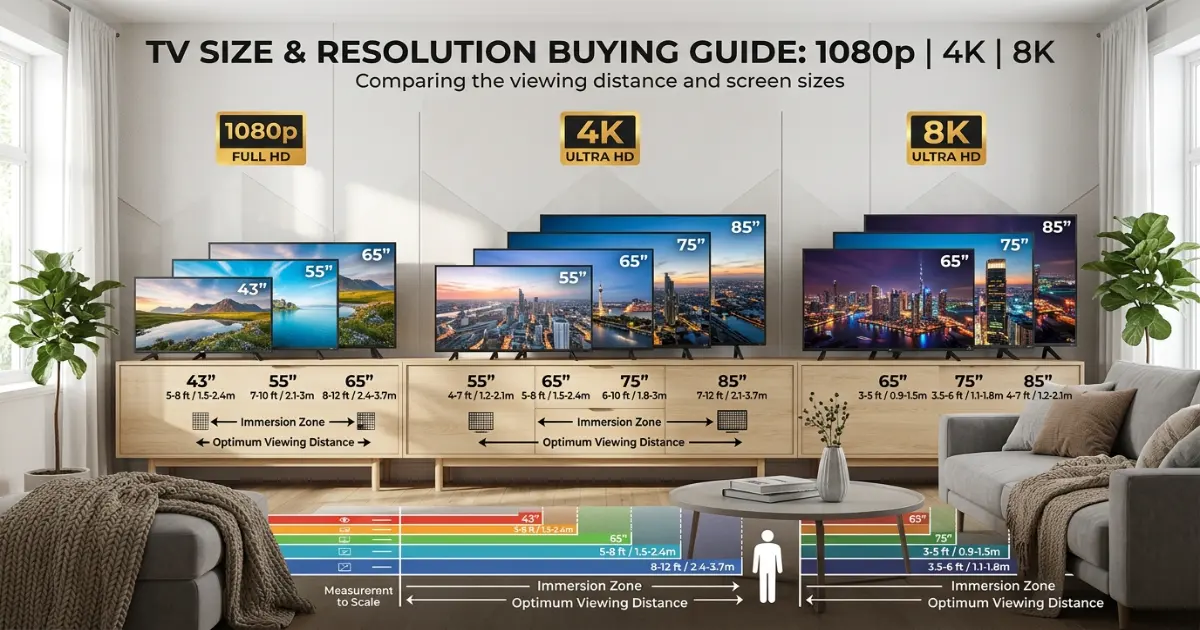
These estimates assume a 4K UHD TV and general viewing. Use the calculator above for your exact room. 1080p sets need more distance for the same size, while 8K sets can be viewed comfortably even closer, so treat the table as a starting reference rather than a final purchase.
| Viewing Distance | 1080p | 4K UHD | 8K UHD | Best Fit |
|---|---|---|---|---|
| 5 ft (60 in) | 38 in | 60 in | 98 in | 43–50 in |
| 6.5 ft (78 in) | 49 in | 78 in | 130 in | 50–55 in |
| 8 ft (96 in) | 60 in | 96 in | 160 in | 55–65 in |
| 10 ft (120 in) | 75 in | 120 in | 200 in | 65–75 in |
| 12 ft (144 in) | 90 in | 144 in | 240 in | 75–85 in |
| 15 ft (180 in) | 113 in | 180 in | 300 in | 85–98 in |
Four viewing profiles — and how they shift the recommendation.
How you use the TV changes the ideal size. Here is what each profile favors, how it adjusts the recommendation, and which rooms it suits best.
Movies & Home Theater
A cinema-like field of view favors sitting relatively close to a large screen. Recommends a size on the larger end of the range for maximum immersion in dark rooms.
Ratio: closerGaming
Balances an immersive picture with enough distance to track fast on-screen motion comfortably and see peripheral HUD elements without excessive eye movement.
Ratio: balancedGeneral Viewing
An everyday mix of streaming, news and casual viewing. Uses the standard resolution-based ratio without leaning toward either a bigger or more conservative size.
Ratio: standardSports
Fast motion and wide-shot camera work are easiest to follow with a bit more breathing room. Recommends a size on the more conservative end for natural, comfortable viewing.
Ratio: furtherSee how the ideal size changes by room.
These steps cover the essentials: measuring seating distance, choosing a resolution, and confirming the size fits your wall before you buy.
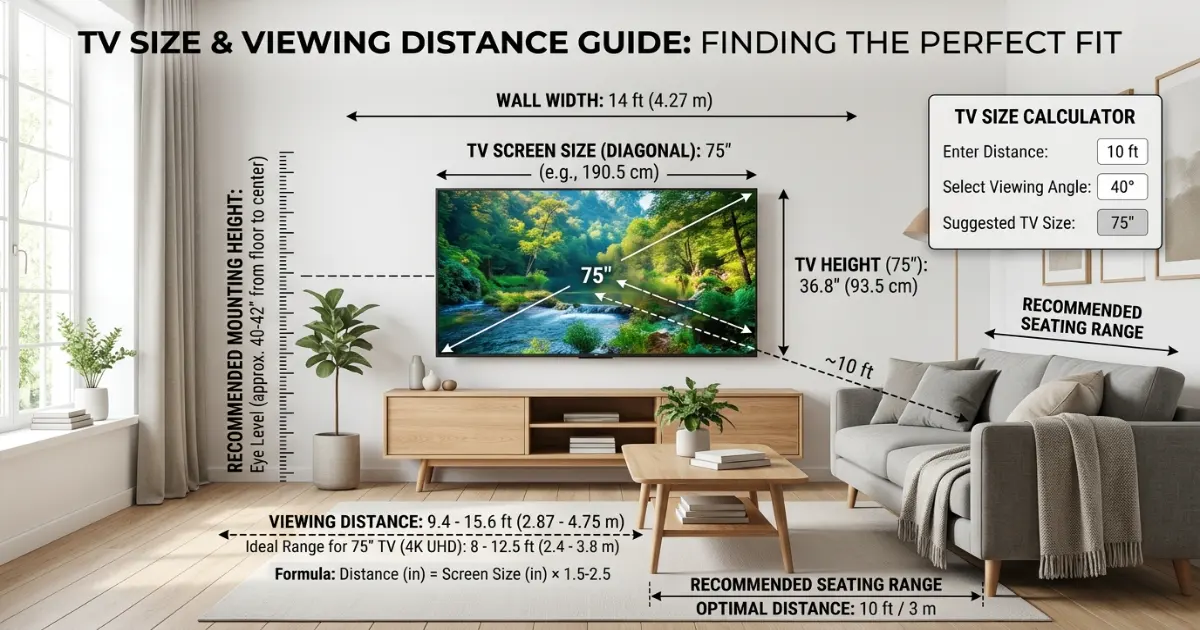
Measure the viewing distance
Start with the distance from the main seat to the wall before choosing a screen size. Write it down along with wall width, since both feed into the recommendation.
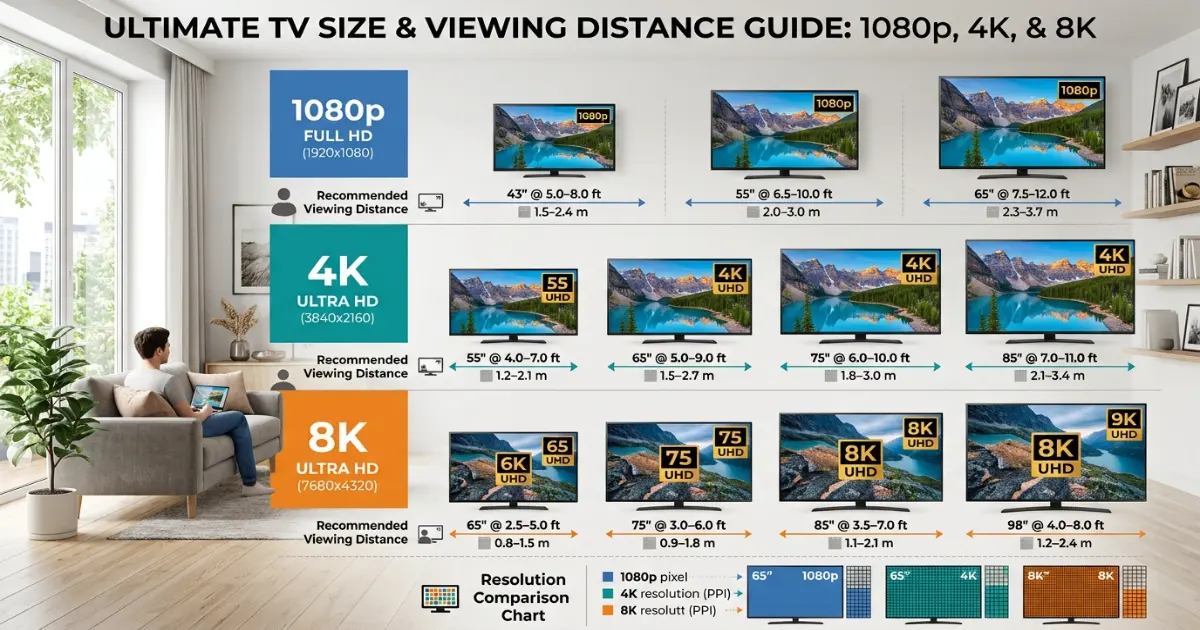
Choose a resolution
Higher resolutions let you sit closer without seeing pixels. This is usually the single factor that changes a size recommendation the most, more than viewing profile alone.
Confirm the wall fit
A screen that’s technically ideal for the distance can still be too wide for a narrow wall. Always check the wall-fit limit before ordering.
How to calculate TV size — the complete guide.
The most common TV-buying mistake is sizing for the room, not the seat. A screen that looks proportionate standing in an empty showroom can feel completely different from the couch at home. Always base the decision on the actual seating distance and resolution, not the size of the wall alone.
Step 1: Measure the viewing distance
Measure from the front edge of the main seating position to where the screen will sit on the wall, in a straight line. For sectionals or multiple seating areas, measure to the seat that will be used most often, and treat any far-back seats as a secondary, more forgiving distance rather than the primary target.
Step 2: Measure the wall width
Measure the available wall width between any obstructions, such as door frames, windows or built-in shelving. This becomes the ceiling on screen size regardless of what the viewing distance alone would suggest, and it’s the number that most often gets skipped in a quick online search.
Step 3: Choose a resolution
1080p Full HD needs the most distance per inch of screen to avoid visible pixels, with a comfortable ratio around 1.6 times the diagonal. 4K Ultra HD packs about four times the pixel density into the same area, allowing a ratio closer to 1.0 times the diagonal. 8K Ultra HD pushes that further still, to around 0.6 times the diagonal, though genuine native 8K content remains limited.
Step 4: Choose how you watch
Movies and home theater setups favor sitting closer to a larger screen for an immersive, cinema-like field of view. Sports and fast wide-shot content are usually more comfortable with a bit more distance relative to size. Gaming sits in between, balancing immersion with the ability to track fast motion and read on-screen text. General mixed use follows the standard resolution ratio without adjustment.
Step 5: Calculate the size range
Divide the viewing distance in inches by the resolution ratio to get a recommended diagonal size, then apply a wider range around it: a smaller, more conservative size for a relaxed field of view, and a larger, more immersive size for those who prefer the screen to fill more of their vision. Most viewers land somewhere in the middle of that range rather than at either extreme.
Step 6: Check the wall-fit limit
For a standard 16:9 widescreen TV, the width is about 87 percent of the diagonal measurement. Multiply your wall width by roughly 90 percent to leave breathing room on either side, then divide by 0.87 to find the largest diagonal that will fit comfortably without dominating the wall edge to edge.
Step 7: Reconcile distance and wall fit
If the distance-based recommendation is larger than what the wall can comfortably fit, the wall becomes the limiting factor, and it’s worth considering a room layout change, such as moving seating closer, rather than compromising on a screen that overwhelms the space. If the wall can fit a much larger screen than the distance recommends, resist the urge to maximize size purely because the space allows it.
Step 8: Avoid the most common sizing mistakes
Sizing for the showroom rather than the actual seat is the most frequent mistake, since store displays are usually viewed from much farther away than a living room couch. Ignoring wall width until after purchase is another, leading to a TV that looks oversized against door frames or windows. Finally, buying a high resolution set but keeping the same distance recommendation as a lower resolution one wastes the extra clarity the panel is capable of showing.
TV mounting types: wall-mounted, stand and corner units
- Wall-mounted — sits closer to the wall and reads as more minimal, and lets you fine-tune height for the seating position. Needs studs or a mounting plate rated for the TV’s weight.
- TV stand or console — the most flexible option, easy to reposition and usually paired with storage for media equipment. Screen height is fixed by the furniture rather than adjustable.
- Corner unit — makes use of an awkward corner in smaller rooms, though it can introduce off-axis viewing angles for seats not directly facing the screen.
- Ceiling or articulating mount — allows the screen to swivel toward multiple seating areas, useful in open-plan rooms where no single wall directly faces every seat.
TV buying rules that prevent a mismatched screen.
A calculator gives the best starting numbers, but the final purchase still depends on wall obstructions, seating arrangement, and how the room is used day to day. The rules below cover the details that a single distance measurement can’t capture on its own, and they’re worth reviewing even after you’ve settled on a size from the calculator above.
For most living rooms, divide your viewing distance in inches by 1.0 for a 4K set to get a recommended diagonal, then confirm that width is under 90 percent of your available wall width. If the two disagree, the smaller of the two numbers should win, since an oversized screen for the wall is harder to live with than a slightly smaller one for the distance.
Never size for the showroom
Store displays are viewed from farther away than most living rooms. Always base your decision on your actual seat-to-wall distance, not how a size looked on the sales floor.
Check wall width before falling in love with a size
A TV that’s technically ideal for the distance can still overwhelm a narrow wall. Measure available wall width first, and treat it as a hard ceiling on size.
Match resolution to viewing distance
Buying a high resolution panel but sitting at a 1080p-appropriate distance wastes the extra detail. Confirm your seating distance suits the resolution before paying more for it.
Confirm mount weight ratings
Larger screens are heavier than they look. Check that any wall mount or stand is rated for both the TV’s weight and its VESA hole pattern before installation day.
Finally, if the room hosts multiple activities, size for the most demanding one, typically movies or gaming, and rely on distance and lighting adjustments for lighter tasks like background news. A size that’s right for a movie night rarely feels wrong for a casual afternoon show.
Helpful room planning topics.
A TV rarely stands alone in a room’s design. Once you know the size, it helps to plan the surrounding elements at the same time — sofa distance and seating layout, rug placement in front of the media wall, and lighting to reduce glare on the screen. Getting these elements to agree with each other is usually what separates a media wall that feels intentionally designed from one that feels bolted on after the fact. Use these supporting pages from the HomeStyle Calculator homepage to plan the rest of the room.
Six things home theater installers always check before mounting a TV.
Sit at the actual seat before deciding
Tape a piece of cardboard or paper roughly the size of the screen to the wall and sit at the real seating position. This reveals how a size actually feels far more reliably than a showroom guess.
Center the screen on the seating, not the wall
If the couch is off-center to the wall, center the TV on the seating position instead, even if that means the screen isn’t perfectly centered on the wall itself.
Mount at eye level, seated
The vertical center of the screen should land roughly at eye level for the main seat when seated, which is often lower than instinct suggests, especially for larger screens.
Check for window glare
A wall directly across from a large window often suffers from daytime glare regardless of screen size. Blackout curtains or an anti-glare panel coating can matter more than the size decision itself.
Confirm stud spacing before buying a mount
Full-motion mounts need studs at the right spacing for the chosen mount plate. Check this before purchasing rather than after the TV arrives.
Leave cable slack for tilt or swivel
If the mount tilts or swivels, leave enough slack in the HDMI and power cables to move freely, ideally routed through an in-wall channel for a clean look.
TV sizing questions — answered.
12 calculators for every room decision.
Every tool uses professional designer formulas. Free, instant, no sign-up — just enter your room and get the exact answer.
Bookmark HomeStyle Calculator for every room in the house.
From a small bedroom to a whole home theater, our free tools give you the exact TV size and wall-fit check before you buy.