TV stand size for 65 inch TV: Best complete guide
TV stand size for 65 inch TV commonly falls between 60 and 72 inches wide. Around 66 inches often looks balanced, but safe fit depends on the exact TV body width, outer feet spacing, foot depth, furniture stability and rated weight capacity.
Written and reviewed by Rehana K · Safety-first, measurement-first method.
TV stand size for 65 inch TV: use 60 to 72 inches, then verify exact support.
A 60-inch console can work but may look tight. Around 66 inches often creates a balanced appearance. A 72-inch console gives more room for a soundbar, speakers and decor.
These are visual shopping ranges—not safety guarantees. Both feet or the full pedestal must sit completely on the top surface, the depth must support the footprint, the rated capacity must exceed the total load and the TV and furniture should be anchored according to their instructions.
Combine stand size with exact TV dimensions and viewing distance
Choose the diagonal, record the complete product dimensions and feet, then verify furniture fit, room proportion and screen height.
TV stand size from width rule to safe anchored installation
TV stand fit calculator
Enter the exact TV and furniture specifications. The calculator checks width, foot support, depth, weight capacity and visual margin.
Safety and proportion checks
Both feet fit the top width.
Foot depth fits the top.
Capacity exceeds load.
Total stand width beyond TV body.
This setup passes the entered dimensional and capacity checks. Confirm manufacturer instructions, stability and anchoring before use.
TV stand size for 65 inch TV: the rule that actually works
The safest TV stand rule is not based on diagonal size alone. A 65-inch diagonal describes the visible screen, not the complete body, support feet, depth or weight.
The feet or center pedestal must sit completely on the top surface.
Furniture capacity must cover the TV and every item placed on it.
After safety passes, several extra inches can create calmer proportions.
For many 65-inch televisions, a 60 to 72-inch console is a practical commercial shopping range. The complete TV body is often around the high-50-inch range, but model specifications vary.
A 60-inch stand creates a close fit. A 66-inch stand often gives approximately four inches of side margin on each side of a roughly 57.5-inch body. A 72-inch stand creates a wider visual base.
The exact feet spacing may be much narrower than the TV body, especially with a center pedestal or adjustable feet. Safe support is determined by the actual contact points and furniture capacity.
Minimum safe size versus ideal-looking size
The minimum safe stand is the smallest top surface that fully supports the installed feet or pedestal, provides adequate depth and carries the complete load without instability.
The ideal-looking stand is a design choice. Many rooms benefit from a console that is at least as wide as the TV body and often six to twelve inches wider overall.
Do not reverse these priorities. A visually perfect 72-inch console is unsuitable when its top is too shallow or its capacity is too low. A properly rated 60-inch console can be safe even when it looks tight.
For wall-mounted TVs, the console does not support the screen, so width becomes mainly a visual and storage decision. The furniture should still be stable and anchored when appropriate.
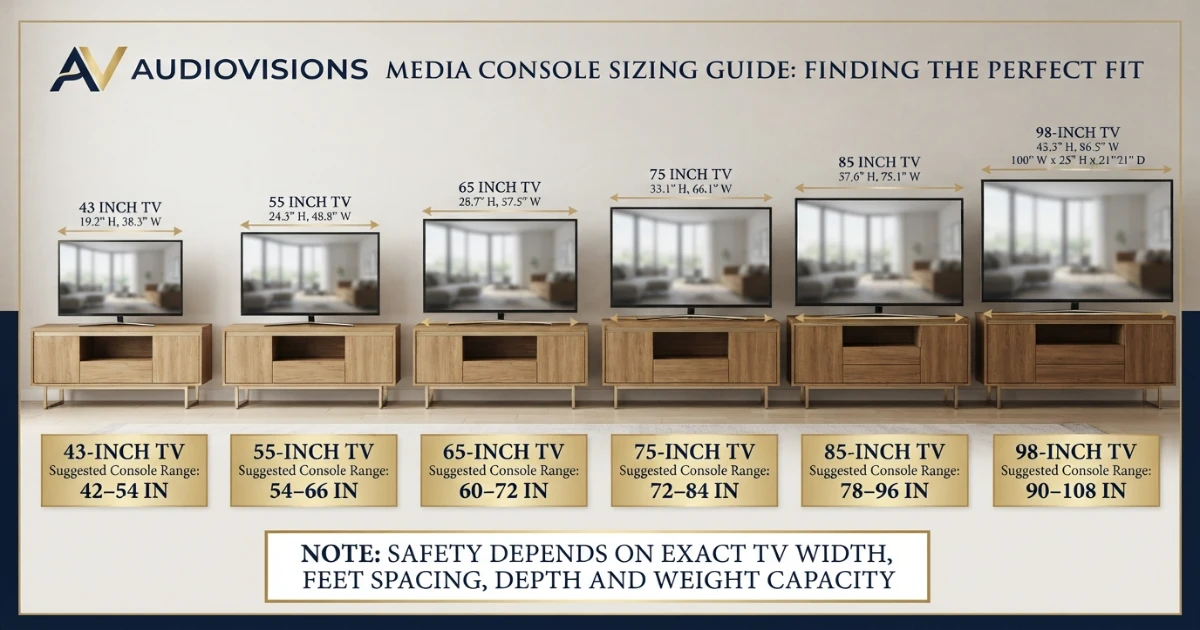
TV stand size vs TV size chart
This chart provides visual shopping ranges, not universal safety minimums. Use exact complete TV width, feet spacing, foot depth and weight before ordering.
| TV size | Approx. visible width | Visual console range | Typical category |
|---|---|---|---|
| 32 in | 27.9 in | 36–48 in | Compact console |
| 43 in | 37.5 in | 42–54 in | Small media console |
| 50 in | 43.6 in | 48–60 in | Medium console |
| 55 in | 47.9 in | 54–66 in | Medium-wide console |
| 65 in | 56.7 in | 60–72 in | Wide console |
| 75 in | 65.4 in | 72–84 in | Extra-wide console |
| 85 in | 74.1 in | 78–96 in | Large media console |
| 98 in | 85.4 in | 90–108 in | Architectural-scale console |
Why TV feet spacing matters more than diagonal size
TVs use several support designs: wide outer feet, inward feet, adjustable-position feet, a central pedestal or a broad center plate.
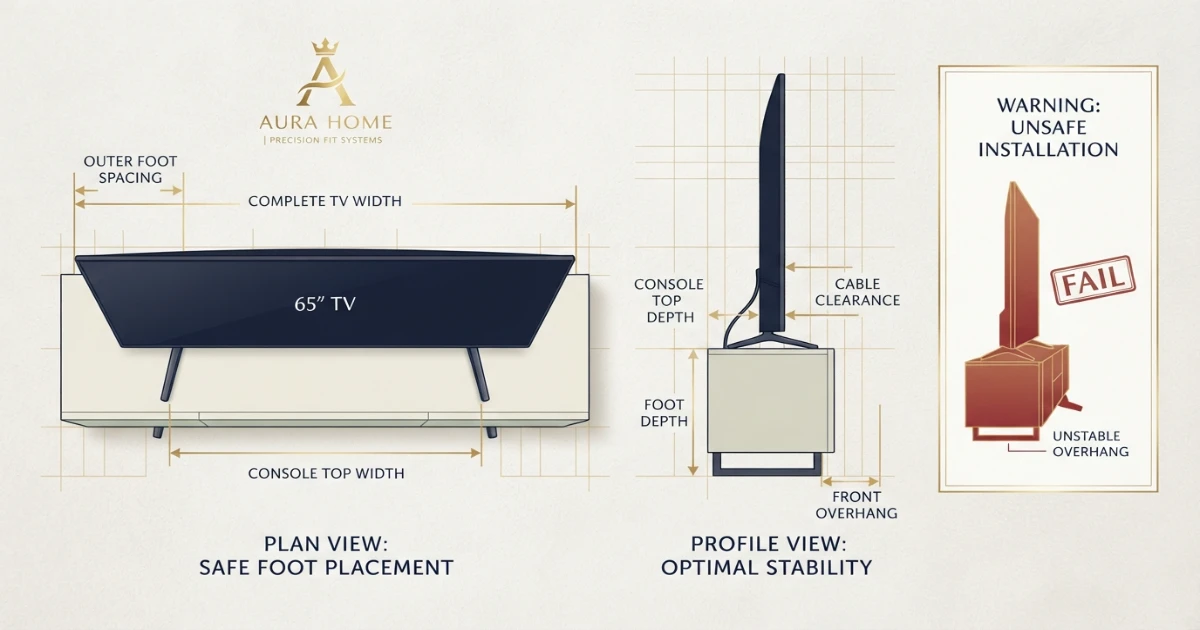
Measure outer foot spacing from the outside edge of one foot to the outside edge of the other. Do not measure from the center points unless the manufacturer specifically defines spacing that way.
Every part of each foot must remain on the furniture top. A foot that overhangs or sits partially on rounded trim does not have complete support.
Some 65-inch televisions allow narrow and wide foot positions. Verify which positions are approved and whether a soundbar fits when the feet move inward.
Use the setup guide rather than guessing where the feet attach. Incorrect stand assembly can damage the television or create instability.
How deep should the TV stand be?
Top depth must support the entire front-to-back footprint of both feet or the pedestal. A stand can be wide enough and still be unsafe because it is too shallow.
Measure the deepest point of the feet, including angled toes. Check whether the TV leans slightly backward as designed and whether the rear housing extends beyond the furniture.
Allow room for cable bends, power connectors and HDMI plugs. Do not force cables against the wall or furniture back.
Soundbars, game consoles and streaming boxes also need top or shelf depth and ventilation. Record the complete equipment footprint rather than planning for the TV alone.
A deeper console can improve stability, but only when the furniture construction and weight distribution are suitable.
TV stand weight-capacity rule
Use the furniture manufacturer’s rated capacity. Do not estimate capacity from console width, material appearance or how heavy the furniture feels.
Add the TV weight with its tabletop stand, soundbar, game consoles, receivers, speakers and decorative items placed on the unit.
Leave a reasonable capacity margin rather than choosing furniture rated exactly at the calculated load. Dynamic forces from moving equipment, opening drawers or accidental contact can affect stability.
Check whether capacity is stated for the top panel, each shelf or the entire unit. A total cabinet rating does not always mean the top can carry the same weight.
Inspect assembly instructions and install every brace, center support, back panel and fastener. Missing hardware can reduce stability and capacity.
60 vs 66 vs 72-inch TV stand for a 65-inch TV
Compact and visually tight. Check complete TV body width, feet spacing and soundbar room carefully.
Balanced starting point for many rooms. Often provides several inches beyond the TV body.
Generous visual base with more space for audio equipment, storage and decor.
For a TV stand size for 65 inch TV decision, compare the exact television body, outer feet spacing and room width before choosing between 60, 66 and 72 inches.
A 66-inch console often aligns well with a roughly 57 to 58-inch complete TV body while remaining manageable in standard family rooms.
A 72-inch console works well under wall-mounted or tabletop 65-inch TVs when the room has enough width. Confirm walking paths, doors and nearby furniture.
How console width changes visual balance
A narrow console makes the television appear larger and more dominant. A wider console creates a stronger horizontal base and can make the wall feel calmer.
For a tabletop TV, furniture must look balanced without compromising support. For a wall-mounted screen, console width can be selected more freely because the furniture is not carrying the TV.
Keep the entire wall composition in mind. Floor speakers, cabinets, windows, artwork and fireplace surrounds affect the visual width.
Very wide consoles can look low and architectural, while tall narrow units can make the screen appear perched. Furniture height also changes the relationship with screen center.
Use painter’s tape to mark both the TV body and the proposed console width before buying.
How tall should a TV stand be?
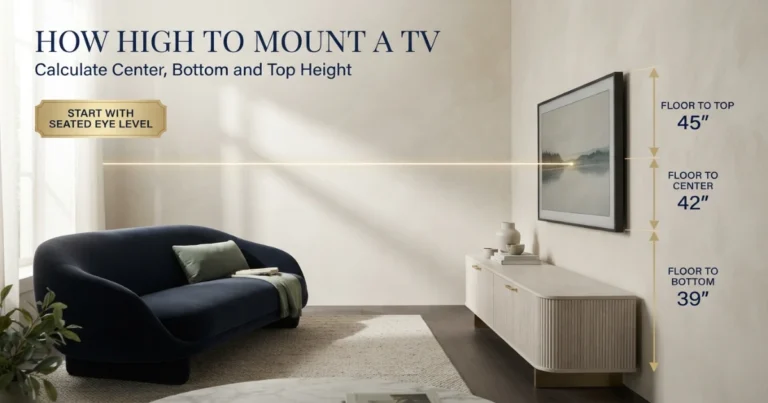
The stand height should help place the TV screen center near seated eye level. For a 65-inch TV, the visible screen is about 31.9 inches high.
When the stand and TV feet place the screen bottom 24 inches from the floor, the center is around 40 inches high. A taller console raises the center and can create an upward viewing angle.
Record the console height, TV height with stand and distance from the furniture top to the visible screen bottom.
If the correct-width console is too tall, consider a lower media unit or wall mounting at the calculated height rather than accepting a screen that causes neck strain.
Use the TV Mounting Height Guide for center-height planning.
Soundbar, speakers and equipment storage
Check the vertical gap between the console top and visible screen. A soundbar can block the picture or remote sensor when the TV sits low.
Some televisions have adjustable feet that raise the screen for a soundbar. Use only manufacturer-approved positions.
Closed cabinets need ventilation for receivers and game consoles. Do not pack heat-producing equipment tightly into unventilated compartments.
Plan cable openings large enough for plugs and power bricks. Keep cables away from drawer slides, sharp edges and door hinges.
When floor speakers flank the console, leave enough side space so the complete arrangement does not feel cramped.
TV and furniture anti-tip safety
CPSC recommends placing televisions on sturdy furniture designed to hold a TV, anchoring televisions and furniture, and pushing the TV as far back as practical when it is not wall mounted.
Anchor and protect
Use the TV and furniture manufacturer instructions. Anchor the console to suitable wall structure, secure the TV with an approved method, manage cords and keep tempting objects away from climbing children.
Do not place a television on unstable furniture, a chest with open drawers, folding furniture or a surface that flexes under load.
Anchoring hardware must match the furniture and wall. Drywall alone may not provide the required attachment without approved anchors or framing.
Keep heavy equipment on lower shelves and avoid storing toys, remotes or attractive objects where children may climb to reach them.
Check restraints periodically and after moving the furniture. Replace damaged or recalled anti-tip components.
Choosing a console under a wall-mounted TV
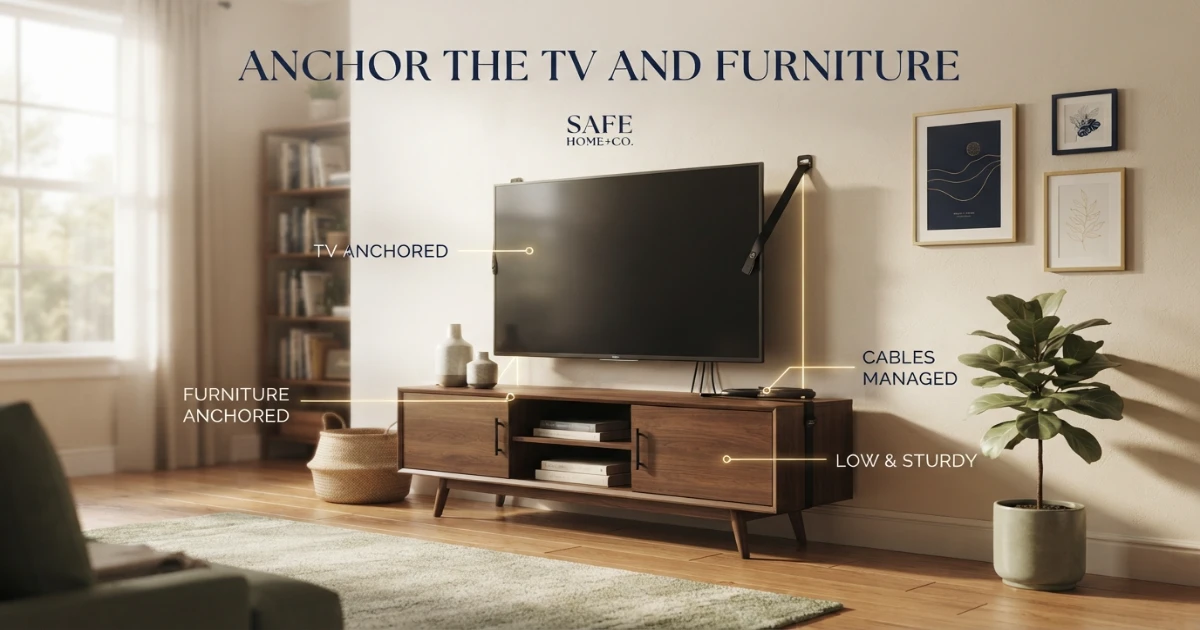
When the TV is wall mounted, the console no longer needs to support its feet or weight. Width, height, storage and visual balance become the main furniture considerations.
The console should not force the screen center too high. Measure furniture height, soundbar height and the desired gap below the TV.
A console wider than the screen body can create a calm built-in appearance. A narrower unit can work in compact rooms when the composition is intentionally balanced.
Keep access to power and signal connections. Full-motion mounts need cable slack that does not catch on furniture.
The console itself should still be stable and anchored where required, especially if it has drawers, doors or climbing hazards.
Doors, drawers and everyday use
Open every door and drawer in the proposed location. Handles may collide with nearby walls, speakers or furniture.
Remote controls may require open fronts or IR-compatible doors. Game consoles can need unobstructed ventilation and disc-loading clearance.
Check whether the center leg or furniture support blocks cable routing. Some wide consoles need center feet that must sit fully on the floor.
Keep frequently used equipment at a comfortable height. A beautiful extra-low console can be inconvenient when every connection requires kneeling.
Consider cleaning access under and behind the furniture, especially with pets or robotic vacuums.
Material and construction considerations
Solid wood, engineered wood, metal and glass consoles can all be suitable when designed and rated for the load.
Material name alone does not prove capacity. Joinery, panel thickness, hardware, center supports and base design determine performance.
Glass tops must be rated for the concentrated load of TV feet and protected from impact. Do not place feet on chipped or cracked glass.
Engineered-wood furniture should be assembled exactly as instructed. Over-tightening or stripping fasteners can weaken connections.
Level the furniture on the floor. Use approved adjustable feet or shims rather than allowing the console to rock.
Step-by-step TV stand measurement process
Use viewing distance and preference rather than furniture width alone.
Record width, height, depth and weight with the tabletop stand.
Use the approved installed foot position.
Include angled toes and the complete support footprint.
Include soundbar, consoles, receiver and decor.
Verify full support in width and depth.
Use the top-panel or complete furniture rating as applicable.
Choose tighter, balanced or generous proportions after safety passes.
Combine console and TV dimensions.
Preserve sensors, ventilation and connector access.
Follow TV, furniture and CPSC guidance.
Common TV stand size mistakes
- Choosing furniture from TV diagonal alone.
- Using visible screen width as complete product width.
- Checking console width but not feet spacing.
- Allowing feet to overhang rounded or narrow edges.
- Ignoring foot depth and angled legs.
- Estimating weight capacity from furniture appearance.
- Forgetting soundbar and equipment weight.
- Choosing a console so tall that the screen center becomes uncomfortable.
- Blocking ventilation or cable connections.
- Assuming a dresser is automatically suitable for a TV.
- Skipping TV and furniture anchoring.
- Keeping toys or remotes where children may climb.
- Buying before checking doors, drawers and walking paths.
- Using recalled or damaged anti-tip hardware.
TV stand size for 65 inch TV buying checklist
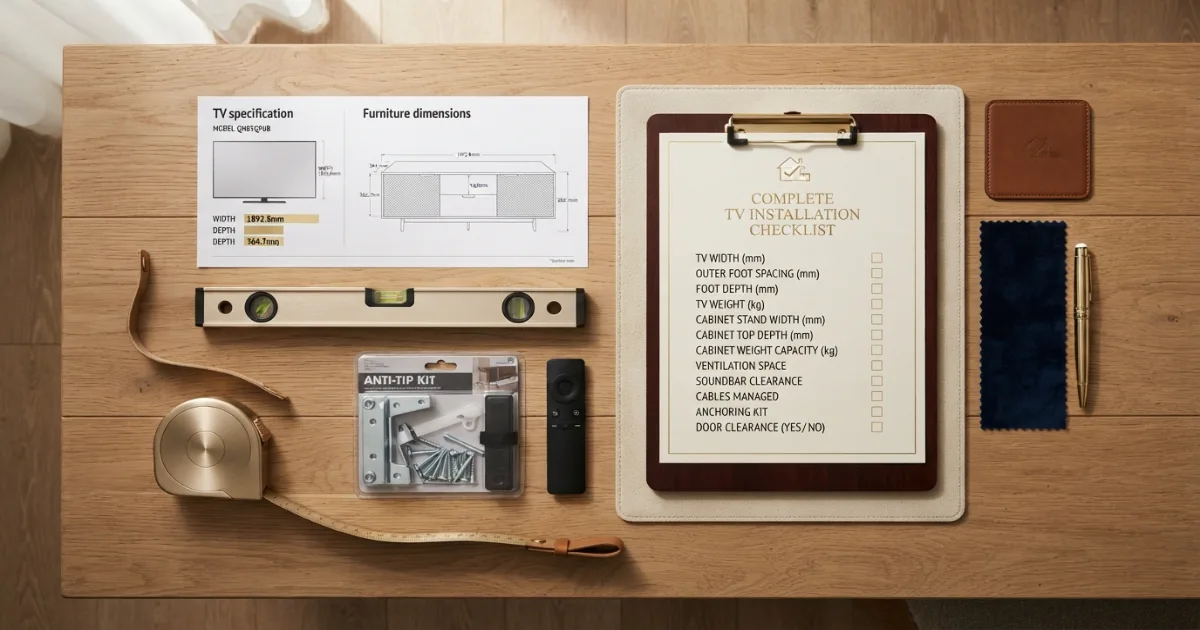
- Exact complete TV width with stand.
- Outer foot spacing in the approved position.
- Complete foot or pedestal depth.
- TV weight with tabletop stand.
- Soundbar and equipment weight.
- Console top width.
- Console top depth.
- Top-panel and total weight capacity.
- Furniture height and resulting screen center.
- Soundbar and remote-sensor clearance.
- Ventilation for all equipment.
- Cable openings and plug clearance.
- Doors, drawers and walking paths.
- Furniture level and assembly complete.
- TV pushed back without blocking ventilation.
- TV and furniture anchoring method.
- Wall attachment matched to wall type.
- Product recalls checked for restraints and hardware.
Final answer: TV stand size for 65 inch TV
TV stand size for 65 inch TV commonly ranges from 60 to 72 inches wide, with approximately 66 inches as a balanced visual starting point for many rooms.
The safest TV stand size for 65 inch TV setups must support the exact feet or pedestal completely, provide enough depth, exceed the combined equipment weight and remain stable.
Use the television and furniture specification sheets, calculate screen-center height, plan audio and cables, and anchor the TV and console according to their instructions.
Need to confirm whether 65 inches is the right TV size?
Use the free TV Size Calculator before buying the console.
Official TV-size and tip-over safety references
Two TV-furniture categories to compare
Review exact dimensions, top-panel capacity, assembly instructions and anti-tip provisions before ordering.
60–72 Inch TV Stands
Compare wide media consoles for 65-inch TVs by top depth, capacity, storage and anti-tip hardware.
- Check complete top dimensions
- Verify rated capacity
- Review anchoring instructions
Universal Tabletop TV Stands
Useful when original feet do not fit the furniture, but compatibility, VESA, weight and base depth must be verified.
- Confirm VESA compatibility
- Check weight and size range
- Measure base footprint
Affiliate disclosure: As an Amazon Associate, HomeStyle Calculator may earn from qualifying purchases. Product specifications, prices and availability can change.
TV stand size for 65 inch TV FAQs
What TV stand size is best for a 65-inch TV?
A 60 to 72-inch console is a practical shopping range for many 65-inch TVs. Around 66 inches often looks balanced, but the exact TV width, feet spacing, depth and weight capacity determine safe fit.
Can a 65-inch TV fit on a 60-inch stand?
It can fit if both feet are fully supported, the complete TV body and stand geometry are compatible, and the furniture is designed and rated for the TV’s weight. A 60-inch console may look visually tight.
Is a 72-inch TV stand too big for a 65-inch TV?
No. A 72-inch console usually gives a 65-inch TV generous side space for visual balance, a soundbar, speakers or decor, provided the furniture fits the room.
Should a TV stand be wider than the TV?
For visual balance, a console that is at least as wide as the complete TV body and often several inches wider is a useful design guideline. Safety depends on full foot support, depth, stability and weight capacity.
How wide is a 65-inch TV?
A standard 16:9 65-inch visible screen is about 56.7 inches wide, but the complete product body is slightly wider and varies by model.
How do I measure TV feet spacing?
Use the manufacturer’s specification drawing or measure from the outside edge of one foot to the outside edge of the other after correct stand assembly.
How deep should a TV stand be?
The top must fully support the complete depth of every foot or pedestal. Add room for safe placement, cable bends and any soundbar or media equipment.
How much weight should a TV stand hold?
The rated capacity must exceed the combined weight of the TV, soundbar, consoles and other equipment placed on it. Use the furniture manufacturer’s stated capacity rather than estimating.
Should a TV and stand be anchored to the wall?
Yes, especially where children or vulnerable adults are present. CPSC recommends anchoring TVs and furniture and placing TVs on sturdy furniture designed to hold a television.
Can I use a dresser as a TV stand?
Only when the dresser is designed or confirmed to support the television safely, provides full foot support and sufficient capacity, and both furniture and TV are properly secured. A purpose-built media console is usually easier to verify.