TV size for small room: Best complete apartment guide
TV size for small room layouts usually lands between 43 and 65 inches. A 50 or 55-inch 4K TV is a strong balanced choice for many apartments, while 65 inches works when seating, wall width and furniture clearance support a more immersive setup.
Written and reviewed by Rehana K · Measurement-first apartment planning method.
TV size for small room: start with 43 to 55 inches, then test 65 inches.
Choose 43 to 50 inches for four to six feet, 50 to 55 inches for six to eight feet and 55 to 65 inches for seven to nine feet.
A larger TV can fit a small apartment when the wall is wide enough, the screen center remains comfortable and walking paths stay clear. Measure eye-to-screen distance rather than using the room’s total length.
Combine viewing distance with exact width, furniture and wall placement
Choose the diagonal, check complete dimensions and keep circulation, doors and windows usable.
Small-apartment TV size from distance to final furniture fit
Small-room TV size and fit calculator
Enter eye-to-screen distance, preferred immersion, usable wall width and console width. The tool recommends a common TV size and checks physical fit.
Recommended common size and fit
Nearest common diagonal.
Visible 16:9 width.
Usable wall is wide enough.
Wall mount frees console support.
A 55-inch TV is a balanced starting point from 7 feet. It fits the entered wall width; confirm the exact model body and mounting clearances.
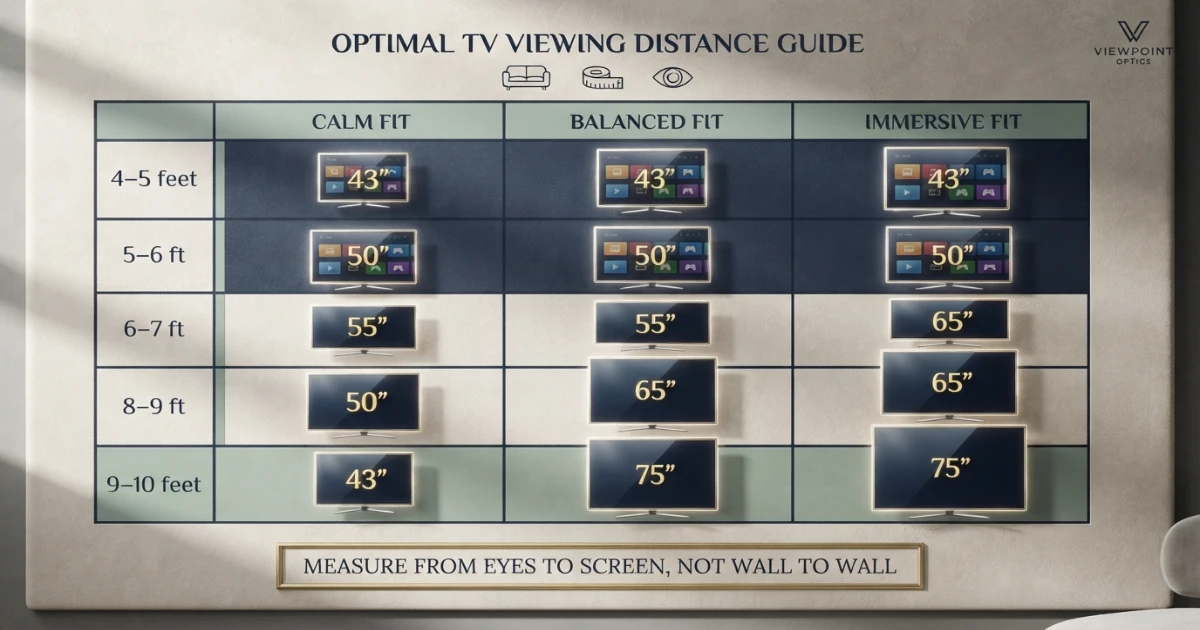
TV size for small room distance chart
The chart separates calm, balanced and immersive choices because compact spaces can support more than one correct size.
| Eye-to-screen distance | Calm fit | Balanced fit | Immersive fit | Typical room |
|---|---|---|---|---|
| 4–5 ft | 32–43 in | 43 in | 43–50 in | Bedroom / studio desk-sofa |
| 5–6 ft | 40–43 in | 43–50 in | 50–55 in | Studio / compact bedroom |
| 6–7 ft | 43–50 in | 50–55 in | 55–65 in | Small living room |
| 7–8 ft | 50–55 in | 55–65 in | 65–75 in | Apartment family area |
| 8–9 ft | 55–65 in | 65 in | 65–75 in | Open-plan apartment |
| 9–10 ft | 55–65 in | 65–75 in | 75–85 in | Larger compact room |
TV size by small-apartment room type
Best when one wall supports sleeping, dining and viewing zones.
Balanced for six to eight feet and mixed TV, movie and gaming use.
Works when the sofa sits farther back and the media wall is uninterrupted.
A TV size for small room decision should begin with the actual seated distance, then be adjusted for wall width, furniture depth and how strongly the screen should dominate the apartment.
A studio apartment often needs the television to remain visually quiet when not in use. A 43 or 50-inch screen leaves more wall space for storage and art.
A separate compact living room can support a stronger focal point. A 55-inch TV commonly balances room proportion and subtitle readability.
An open-plan apartment may feel small in floor area but provide an eight or nine-foot sofa distance. In that layout, 65 inches can be more suitable than a cautious 50-inch choice.
Room label is less important than the actual eye-to-screen measurement, wall width and daily use.
43 vs 50 vs 55 vs 65-inch TV in a small room
| TV size | Visible width | Visible height | Best compact use | Room effect |
|---|---|---|---|---|
| 43 in | 37.5 in | 21.1 in | 4–6 feet | Space-saving |
| 50 in | 43.6 in | 24.5 in | 5–7 feet | Calm and practical |
| 55 in | 47.9 in | 27.0 in | 6–8 feet | Balanced focal point |
| 65 in | 56.7 in | 31.9 in | 7.5–9.5 feet | Immersive and dominant |
Moving from 43 to 55 inches adds about 10.4 inches of visible width and substantially more picture area. Moving from 55 to 65 inches adds about 8.7 inches of visible width and approximately 39.7% more screen area.
A larger screen does not necessarily make a small room feel physically smaller. Poor furniture depth, exposed cables and blocked walking paths usually create more visual clutter than a correctly mounted television.
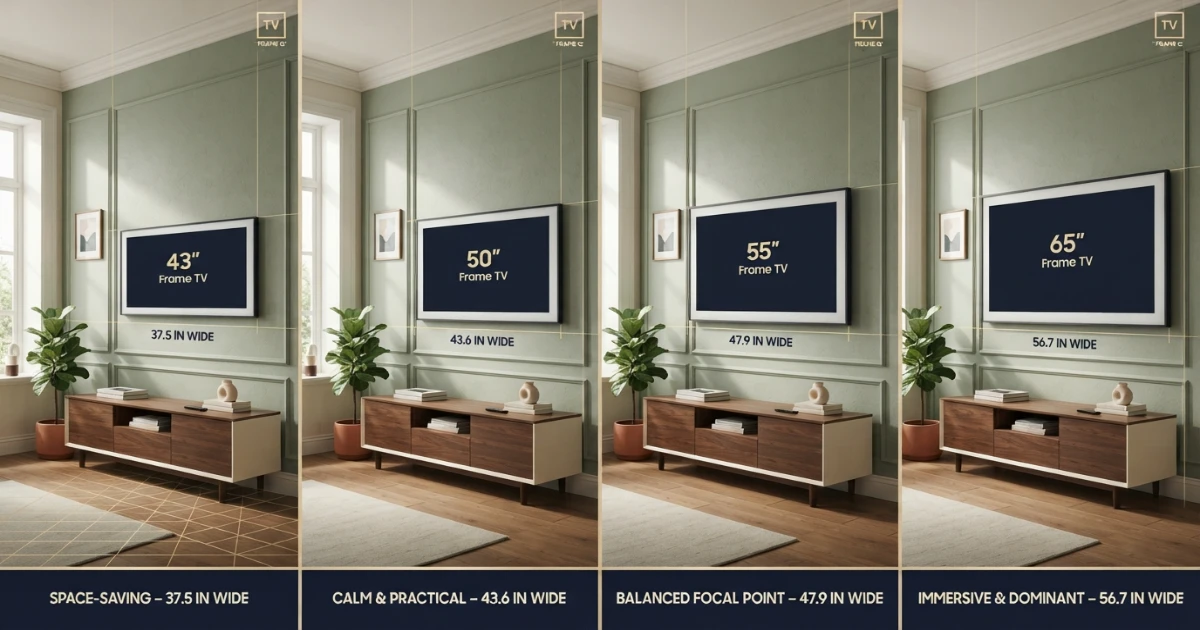
How much wall width does a small-room TV need?
For any TV size for small room layout, usable wall width matters more than the room’s total square footage.
Use uninterrupted wall width after subtracting door trim, windows, shelves, radiators, switches and speaker space.
A 43-inch screen is about 37.5 inches wide. A 50-inch screen is about 43.6 inches wide. A 55-inch screen is about 47.9 inches wide, and a 65-inch screen is about 56.7 inches wide.
The complete TV body is slightly wider than the visible screen because of the bezel. Confirm the exact manufacturer width before buying a mount, floating shelf or cabinet.
Best suited to 43 inches; a 50-inch TV may be visually tight.
Comfortable for 50 or 55 inches; 65 inches requires exact checking.
Supports a balanced 55 or 65-inch apartment setup.
Leave visual breathing space around the television when possible. A TV that nearly touches both wall edges can feel built-in, but only when cables, ventilation and service access are planned.
TV stand depth and floor-space planning
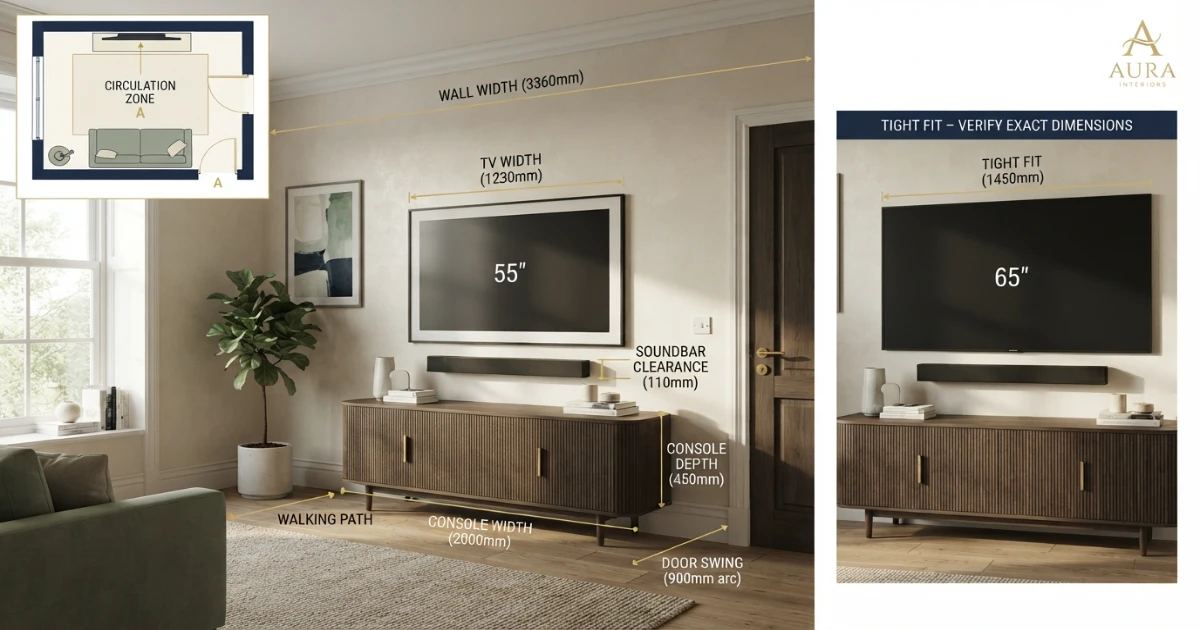
Small apartments often lose more usable space to deep furniture than to screen width. A slim console can preserve circulation and make a larger TV feel cleaner.
For a tabletop TV, the console must fully support the exact feet or pedestal depth and weight. Do not choose a shallow unit only from its front profile.
Measure the deepest foot point, rear cable bend and soundbar footprint. Check whether cabinet doors or drawers project into the walking path.
A wall-mounted TV allows the console to be narrower or shallower because it no longer carries the screen. The furniture should still remain stable and anchored where appropriate.
Use the TV Stand Size Guide for feet spacing, depth and capacity checks.
Protect walking paths and door swings
Map the route between the entrance, sofa, kitchen and balcony or bedroom door. Furniture should not force people to turn sideways during normal movement.
Open nearby doors, drawers and cabinet fronts while marking the proposed console. A television wall can look clear until a door swing reveals a collision.
Check robotic-vacuum clearance, floor vents and baseboard heaters. Avoid blocking required ventilation or placing electronics where moisture or cooking grease accumulates.
Wall mounting can recover several inches of depth, but a full-motion mount extends into the room when pulled forward.
Is wall mounting better in a small apartment?
Wall mounting can reduce visual clutter, save console depth and create room for a narrow floating shelf. It is not automatically allowed in every rental.
Confirm lease rules, wall construction and repair obligations before drilling. Use approved VESA hardware and mount capacity for the exact TV.
Keep the screen center near seated eye level. Mounting high to create storage underneath can reduce comfort and make the TV dominate the room.
Plan a code-compliant power source and cable path. Do not run ordinary power cords inside a wall.
When drilling is prohibited, a stable tabletop stand or freestanding TV mount can provide a lower-impact alternative.
Windows, daylight and glare in compact rooms
Small rooms often place the television opposite or beside a window because wall choices are limited. Check reflections at the hours when the TV is normally used.
A larger screen presents a larger reflective surface. Strong reflection handling and brightness can matter more than moving one size smaller.
Use curtains, blinds or repositioned lamps before raising the screen or turning the room layout upside down.
Side windows can create less direct glare than windows behind the sofa. Test both daytime and evening positions with the screen outline.
Very dark glossy screens can act like mirrors when switched off, affecting how dominant the TV feels in a multipurpose studio.
Sound, bass and apartment neighbors
A larger TV does not require louder sound, but cinematic viewing can encourage higher volume. Shared walls and floors make sound planning important.
Place the soundbar or speakers away from direct contact with party walls when possible. Use isolation pads and reduce excessive bass rather than relying only on lower master volume.
Night modes and dialogue enhancement can improve clarity without disturbing neighbors. Headphones are useful for late gaming and movies.
A compact soundbar can fit a narrow console, but verify that it does not block the screen, remote sensor or feet.
Room acoustics can make a small system sound larger. Soft furnishings, rugs and curtains reduce harsh reflections and echo.
Content quality and screen-size choice
4K content supports larger screens and closer seating because pixel density remains high. Compressed HD, sports feeds and older shows can look rougher on a large apartment TV.
Do not judge only from store demos. Test the streaming services, sports, news, games and older content used at home.
A strong 55-inch TV with good processing may look better than a budget 65-inch TV with weak motion and upscaling.
Subtitle users can benefit from a larger screen at the same distance. Interface scaling and accessibility settings can also improve readability without increasing diagonal size.
Use the 4K Viewing Distance Guide to compare resolution and distance.
Gaming in a small apartment
At five to seven feet, 43 to 55 inches works well for competitive play. A 55 or 65-inch screen adds immersion for racing, sports and split-screen gaming.
Check input lag, game mode, 120 Hz, VRR and HDMI support on the exact model. Size alone does not create a better gaming experience.
Keep consoles ventilated inside compact furniture. Avoid pushing power supplies and cable bundles into closed spaces.
Use headphones or night sound modes for late sessions. A low screen center and supportive seating reduce neck fatigue during long play.
See the TV Size for Gaming Guide for play-style recommendations.
One TV for sleeping and living zones
Studio apartments may use one television from a sofa, dining chair and bed. Measure each eye-to-screen distance and identify the closest regular position.
A full-motion mount can angle the TV toward different zones, but extension changes cable slack and wall leverage.
Choose a screen size that remains comfortable from the closest seat while still readable from the farthest important position.
Swivel tabletop stands can help when wall mounting is not allowed. Confirm the base footprint and stability.
A television that rotates toward the bed should not block a doorway or extend into a circulation path.
How to keep a large TV from overwhelming the room
The best TV size for small room interiors can still be 65 inches when the screen is mounted cleanly and the furniture remains shallow.
Use a low-profile mount or shallow console so the TV reads as part of the wall rather than a bulky object projecting into the room.
Keep cables hidden or neatly grouped. Cable clutter often makes the setup feel larger than the screen itself.
A console close to or wider than the TV body can visually ground the screen. Wall-mounted TVs can use a floating unit to preserve visible floor area.
Choose calm wall colors and restrained decor. Too many small objects around a large black rectangle create visual noise.
Do not mount the TV unusually high for decorative balance. Comfortable screen-center height should remain the priority.
Delivery access in apartments
Measure the shipping box, not only the television. Large-TV packaging may not fit elevators, stair turns or narrow corridors.
Check building delivery hours, loading access and elevator reservations. Some apartment buildings require proof of insurance from installers.
Keep the television upright when required by the manufacturer and use enough people for safe handling.
Retain the packaging until the screen is tested for damage. Returning a large TV without the box can be difficult.
Verify the final wall and console measurements before delivery so the television is not left unsupported.
TV and furniture safety in a compact home
CPSC advises anchoring televisions and furniture, using a sturdy low base, pushing tabletop TVs back as far as practical and keeping cords out of reach.
Small-space safety priorities
Compact rooms place furniture close to seating and walking paths, so stable support and anchoring are especially important.
Do not use an unstable dresser or narrow shelf simply because it saves space. Use furniture designed or verified for the TV’s feet, depth and weight.
Keep tempting objects away from high shelves where children may climb. Place heavier items lower.
Step-by-step small-room TV process
Use the normal sofa, chair or bed position.
Exclude doors, windows, shelves and switches.
Select a range from the chart.
Usually 43 vs 50, 50 vs 55 or 55 vs 65.
Use painter’s tape and check every seat.
Protect full foot support and walking paths.
Keep the TV near seated eye level.
Review reflections in daytime and evening.
Reduce neighbor disturbance and clutter.
Measure the box, elevators, stairs and halls.
Follow TV, furniture and wall instructions.
Common small-room TV size mistakes
- Choosing size from apartment square footage alone.
- Measuring wall-to-wall instead of eyes to screen.
- Assuming a small room always needs a 32 or 43-inch TV.
- Buying 65 inches without checking complete wall width.
- Using screen width instead of complete product width.
- Choosing deep furniture that blocks circulation.
- Ignoring TV feet spacing and console depth.
- Mounting too high to create storage below.
- Forgetting window glare and glossy reflections.
- Ignoring compressed content and upscaling quality.
- Letting soundbar or speakers disturb neighbors.
- Blocking doors, drawers or balcony access.
- Ignoring the shipping box and elevator size.
- Skipping TV and furniture anchoring.
- Buying before testing adjacent sizes with tape.
TV size for small room buying checklist
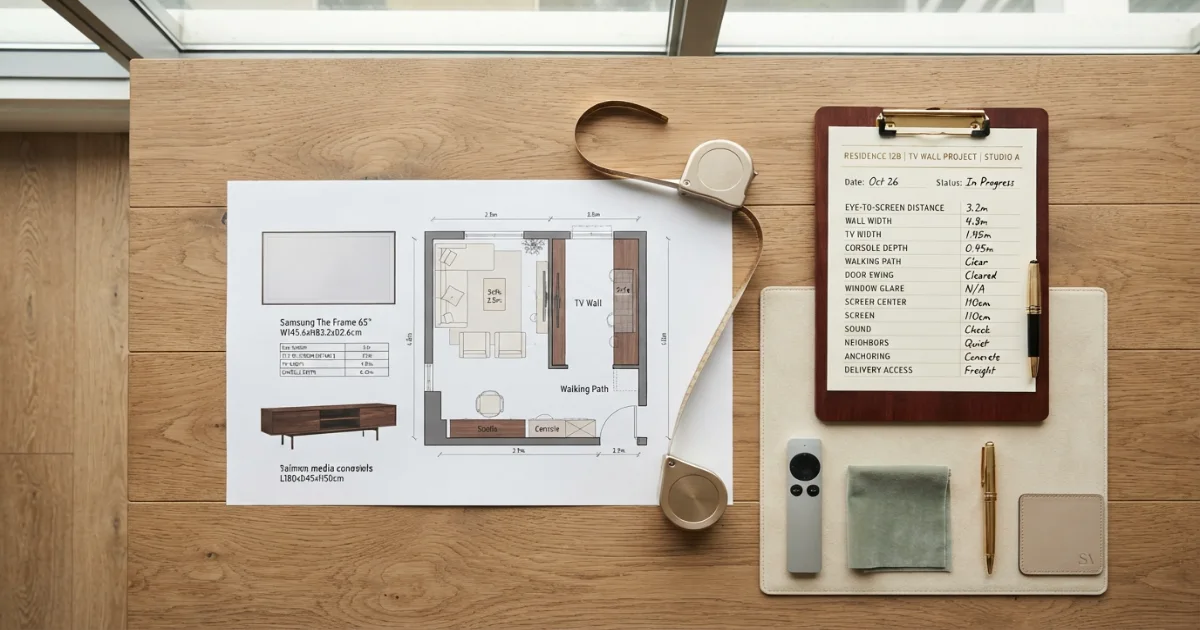
- Exact eye-to-screen distance.
- Closest and farthest regular seats.
- Usable uninterrupted wall width.
- Candidate 43, 50, 55 or 65-inch size.
- Complete TV body width and height.
- TV depth with and without stand.
- Outer feet spacing and foot depth.
- Console width, depth and capacity.
- Walking path and door clearance.
- Wall-mount permission and structure.
- Seated eye level and screen center.
- Window and lamp glare.
- Soundbar and remote-sensor clearance.
- Neighbor-friendly sound settings.
- Console and device ventilation.
- Power and cable route.
- Elevator, stair and delivery access.
- TV and furniture anchoring.
- Real content tested from the actual seat.
- Two adjacent sizes outlined before purchase.
Final answer: best TV size for a small apartment
TV size for small room layouts is commonly 43 to 55 inches, but a 65-inch screen can be the better choice when seating is around eight feet and the wall supports it.
Choose the lower end for a calm multipurpose room, the middle for balanced daily viewing and the upper end for immersive movies, gaming and subtitles.
Confirm complete TV dimensions, console depth, walking paths, door swings, screen-center height, glare, delivery access and anchoring before buying.
Need a size based on your exact apartment distance?
Use the free TV Size Calculator, then compare its result with this small-room chart.
Official viewing and apartment-safety references
Two small-space TV categories to compare
Verify exact dimensions, wall compatibility, load capacity and rental restrictions before ordering.
Slim TV Stands for Apartments
Compare shallow media consoles by top depth, TV capacity, storage and anti-tip hardware.
- Check feet and pedestal depth
- Verify rated capacity
- Measure doors and walking paths
Low-Profile and Full-Motion TV Mounts
Compare mounts by VESA, TV weight, wall type, extension and post-installation adjustment.
- Confirm lease permission
- Match wall construction
- Plan safe cable movement
Affiliate disclosure: As an Amazon Associate, HomeStyle Calculator may earn from qualifying purchases. Product specifications, prices and availability can change.
TV size for small room FAQs
What is the best TV size for a small room?
For many small rooms, 43 to 55 inches is the practical range. A 65-inch TV can work when seating is around 7.5 to 9 feet and the wall has enough width.
What TV size is best for a small apartment living room?
A 50 or 55-inch 4K TV is a strong balanced choice for many compact apartment living rooms with roughly 6 to 8 feet of eye-to-screen distance.
Is a 65-inch TV too big for a small room?
Not automatically. A 65-inch TV is immersive at 7 to 9 feet, but it can dominate a narrow wall, reduce console options and expose lower-quality content more clearly.
Is a 43-inch TV too small for an apartment?
A 43-inch TV works well from approximately 4.5 to 6.5 feet, especially in bedrooms, studios and rooms where the television should remain visually quiet.
Should I choose a 50 or 55-inch TV for a small room?
Choose 50 inches for a calmer fit or narrower wall. Choose 55 inches for more immersion, larger subtitles and a stronger movie or gaming experience.
How far should I sit from a 55-inch 4K TV?
A 55-inch 4K TV commonly works well around 5.5 to 8 feet, depending on preferred immersion and content quality.
How much wall width does a 65-inch TV need?
The visible 16:9 screen is about 56.7 inches wide. The complete TV body is slightly wider, so confirm the exact model and leave room for bezels, cables and visual breathing space.
Is wall mounting better in a small apartment?
Wall mounting can save furniture depth and floor space, but it must use approved wall structure, VESA hardware, safe cable routing and a comfortable screen-center height.
What TV stand size works in a small room?
Choose the shallowest stable console that fully supports the TV feet, depth and weight. A wall-mounted TV can use a narrower or floating console because the furniture does not carry the screen.
How do I make a large TV feel less overwhelming?
Use a low-profile mount, calm wall colors, a console at least close to the TV body width, controlled cable management and enough empty space around the screen.