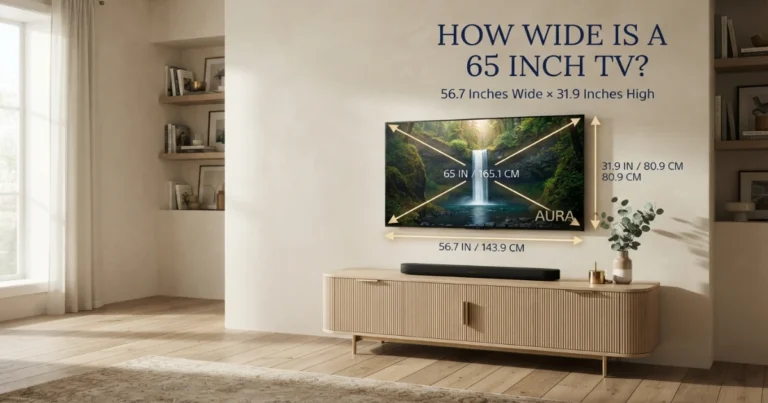
TV size chart: Dimensions in inches and CM
Use this TV size chart to compare the width and height of every common 16:9 television size from 24 to 115 inches. It shows approximate screen dimensions in both inches and centimeters, plus a calculator for any diagonal.
Written and reviewed by Rehana K · HomeStyle Calculator measurement-first method.
TV sizes and dimensions: advertised size means diagonal
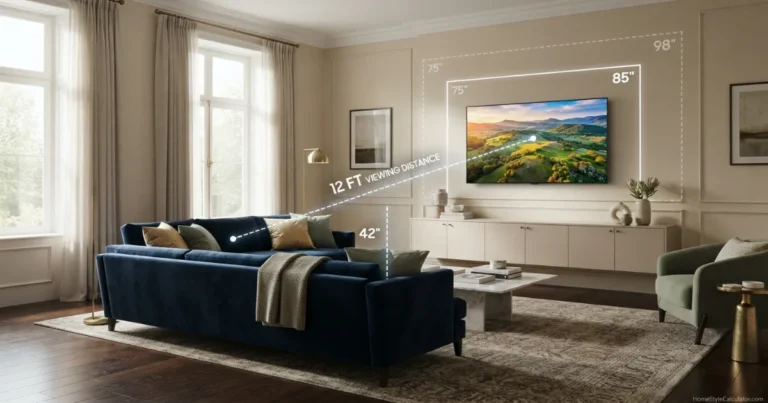
In a standard 16:9 TV size chart, a 55-inch screen is about 47.9 × 27.0 inches, a 65-inch screen is 56.7 × 31.9 inches, a 75-inch screen is 65.4 × 36.8 inches, and an 85-inch screen is 74.1 × 41.7 inches.
These are approximate visible 16:9 screen dimensions. Bezels, stands, feet, depth and complete product measurements vary by model and must be checked on the manufacturer specification sheet.
Use dimensions with distance, furniture and mounting guides
Start with the chart, then confirm viewing distance, comparison size, media-console fit and mounting height.
TV dimensions from diagonal math to final room fit
TV size and dimensions calculator
Enter any diagonal size and available wall or stand width. The tool estimates visible 16:9 width, height, centimeters, area and basic fit.
Approximate 16:9 screen size
144.0 cm
81.0 cm
Visible rectangle estimate.
About 3.3 inches remaining.
A 65-inch 16:9 screen is about 56.7 inches wide and 31.9 inches high. Confirm the complete model dimensions before purchase.
TV size chart: width and height from 24 to 115 inches
This complete TV size chart covers common flat-screen and smart TV sizes from 24 to 115 inches. Width and height are calculated for a standard 16:9 visible screen and rounded to one decimal place.
Use the jump links to move directly to a size. Remember that the chart does not include the bezel, feet, center stand, rear housing or depth.
| TV size | Screen width (in) | Screen height (in) | Screen width (cm) | Screen height (cm) |
|---|---|---|---|---|
| 24 in | 20.9 | 11.8 | 53.1 | 29.9 |
| 27 in | 23.5 | 13.2 | 59.8 | 33.6 |
| 28 in | 24.4 | 13.7 | 62.0 | 34.9 |
| 32 in | 27.9 | 15.7 | 70.8 | 39.8 |
| 40 in | 34.9 | 19.6 | 88.6 | 49.8 |
| 42 in | 36.6 | 20.6 | 93.0 | 52.3 |
| 43 in | 37.5 | 21.1 | 95.2 | 53.5 |
| 48 in | 41.8 | 23.5 | 106.3 | 59.8 |
| 50 in | 43.6 | 24.5 | 110.7 | 62.3 |
| 55 in | 47.9 | 27.0 | 121.8 | 68.5 |
| 58 in | 50.6 | 28.4 | 128.4 | 72.2 |
| 60 in | 52.3 | 29.4 | 132.8 | 74.7 |
| 65 in | 56.7 | 31.9 | 143.9 | 80.9 |
| 70 in | 61.0 | 34.3 | 155.0 | 87.2 |
| 75 in | 65.4 | 36.8 | 166.0 | 93.4 |
| 77 in | 67.1 | 37.8 | 170.5 | 95.9 |
| 83 in | 72.3 | 40.7 | 183.7 | 103.4 |
| 85 in | 74.1 | 41.7 | 188.2 | 105.8 |
| 86 in | 75.0 | 42.2 | 190.4 | 107.1 |
| 98 in | 85.4 | 48.0 | 217.0 | 122.0 |
| 100 in | 87.2 | 49.0 | 221.4 | 124.5 |
| 115 in | 100.2 | 56.4 | 254.6 | 143.2 |
How TV dimensions are calculated
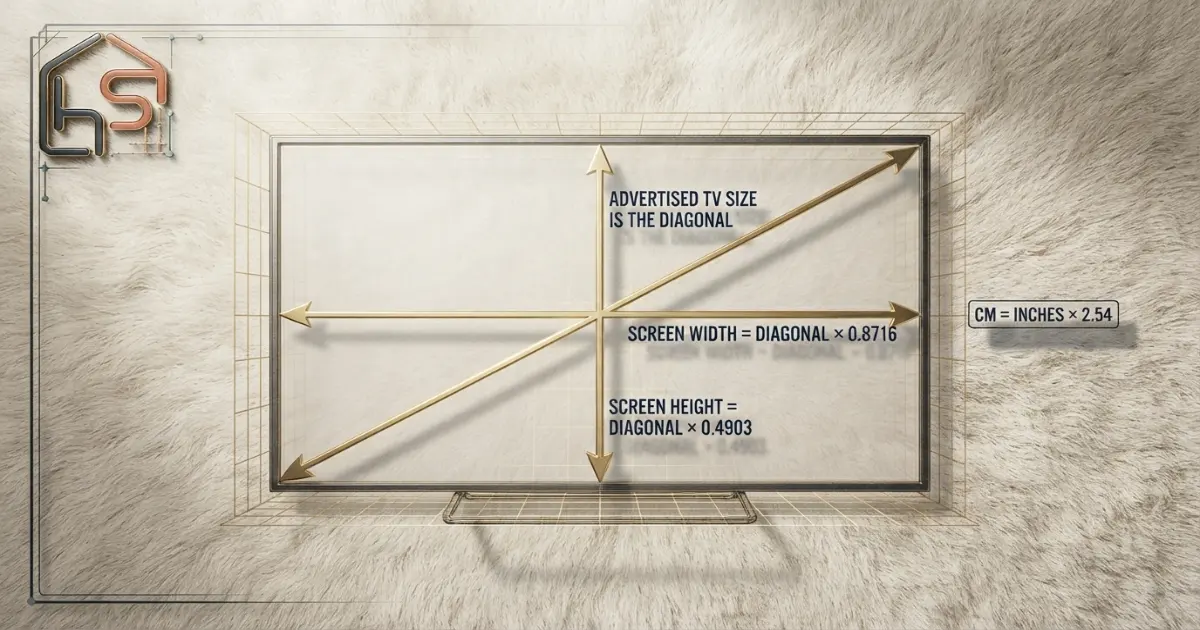
Most modern televisions use a 16:9 aspect ratio. That means the width-to-height relationship is fixed even though the diagonal changes.
For a 16:9 rectangle, the mathematical base is the square root of 16 squared plus 9 squared. That value is the square root of 337, approximately 18.3576.
Screen width
Multiply the diagonal by the horizontal ratio.
Width = diagonal × 16 ÷ √337Screen height
Multiply the diagonal by the vertical ratio.
Height = diagonal × 9 ÷ √337Convert to cm
Convert any inch result to centimeters.
Centimeters = inches × 2.54The simplified multipliers are approximately 0.8716 for width and 0.4903 for height. A 65-inch diagonal therefore produces an estimated width of 56.7 inches and height of 31.9 inches.
These formulas are suitable for standard 16:9 screens. They should not be applied to older 4:3 televisions, ultrawide displays or unusual commercial signage without changing the aspect-ratio math.
Standard TV sizes and dimensions at a glance
121.7 × 68.5 cm
144.0 × 81.0 cm
166.1 × 93.4 cm
188.2 × 105.9 cm
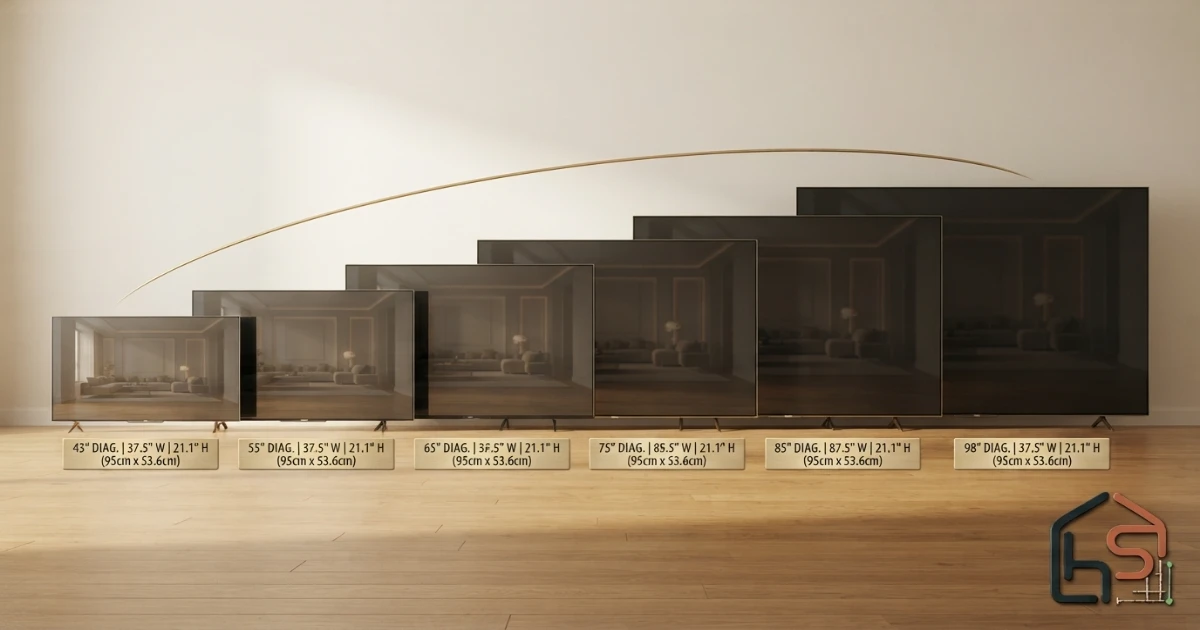
A diagonal increase affects both width and height. Moving from 55 to 65 inches adds about 8.7 inches of visible width. Moving from 65 to 75 inches adds another 8.7 inches, and moving from 75 to 85 inches adds approximately the same amount.
Screen area grows faster than diagonal size because width and height rise together. A larger TV can therefore look substantially bigger even when the diagonal changes by only 10 inches.
Screen dimensions versus complete TV dimensions
The chart describes the visible screen rectangle, not the complete television. Product width includes the left and right bezels. Product height may be listed with and without the stand.
Modern bezels are often thin, but even a small difference matters when a TV must fit inside a cabinet, between speakers or within a narrow wall recess.
Depth can vary much more than visible width. OLED panels may be extremely thin across part of the screen while the electronics housing is deeper. Mini-LED and conventional LED models also have different rear profiles.
Stand feet create another critical measurement. Some televisions place feet near the outer edges, while others use a central pedestal or adjustable positions.
Always verify five manufacturer dimensions: complete width, height without stand, height with stand, depth without stand and depth with stand.
Using the TV dimensions chart for wall fit
Measure the uninterrupted wall area rather than the entire room wall. Subtract windows, doors, shelves, sconces, speakers, trim and any space that must remain clear.
Compare the chart’s visible width with the model’s complete width. Then add the breathing room you want on both sides.
A television can technically fit while still looking crowded. Large screens usually benefit from enough surrounding space to separate them visually from speakers and architectural features.
For a wall mount, confirm the VESA pattern, television weight, mount weight rating, wall construction and stud locations. Diagonal compatibility alone is not enough.
For exact planning, use the How Wide Is a 65 Inch TV? and How Wide Is a 75 Inch TV? guides.
Wall-width examples
60-inch usable wall: A 65-inch screen is about 56.7 inches wide before bezels, creating a tight installation. A 55-inch screen leaves more room.
72-inch usable wall: A 75-inch screen is about 65.4 inches wide and can fit many layouts after the exact model width is checked.
84-inch usable wall: An 85-inch screen is about 74.1 inches wide, leaving useful side clearance for many designs.
96-inch usable wall: A 98-inch screen is about 85.4 inches wide before bezels and requires careful speaker and mount planning.
Using dimensions to choose a TV stand
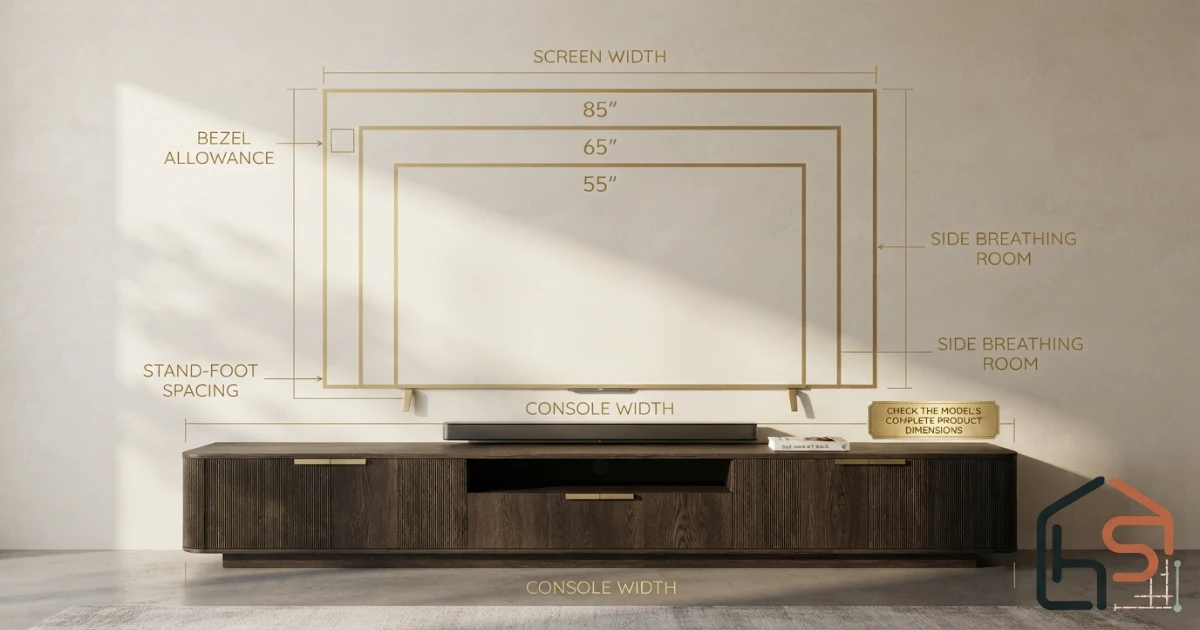
The console’s top must support every TV foot completely. Do not rely only on the visible screen width or advertised diagonal.
Check foot spacing from outside edge to outside edge, foot depth, total television weight and the console’s rated capacity.
A console that is wider than the complete television often looks balanced and provides room for a soundbar, game console or decorative objects. This is a visual preference rather than a substitute for safe support.
When a TV has wide-set feet, wall mounting or a central replacement stand may solve a furniture problem, but compatibility and weight ratings must be verified.
Use the TV Stand Size Guide for a full furniture-fit process.
How screen height affects mounting position
Screen height matters because a larger television extends farther above and below its center. A 55-inch screen is about 27 inches high, while an 85-inch screen is about 41.7 inches high.
If both screens use the same centerline, the larger model’s bottom edge sits lower and its top edge sits higher. If the bottom edge stays fixed, the larger screen center rises and may become uncomfortable.
Plan mounting height from the screen center and seated eye level. Mark the complete outline with painter’s tape and sit normally before drilling.
Soundbar height, console clearance, reclining posture and fireplace placement can change the final position. Use the TV Mounting Height Guide for detailed calculations.
Dimensions and viewing distance are different decisions
Physical fit answers whether the television fits the wall or furniture. Viewing distance answers whether the screen feels relaxed, balanced or immersive from the main seat.
A 75-inch television may physically fit a compact wall but feel too immersive from a very close sofa. A 55-inch screen may fit perfectly but look too small from a distant sectional.
Use the TV Size for 8 Feet, TV Size for 10 Feet and TV Size for 12 Feet guides after checking physical dimensions.
For a broader result based on distance and viewing preference, use the TV Size Calculator.
TV dimensions chart room examples
Apartment living room: A 55-inch screen measures about 47.9 inches wide. It can fit a moderate console while leaving space for compact speakers.
Standard family room: A 65-inch screen is about 56.7 inches wide. Verify the complete model width and whether the stand feet fit the console.
Large family room: A 75-inch screen is about 65.4 inches wide and 36.8 inches high. It needs a broad visual zone and a strong mount or console.
Media-focused room: An 85-inch screen is about 74.1 inches wide. Delivery access, weight, mount capacity and soundbar placement become more important.
Dedicated cinema wall: A 98-inch screen is approximately 85.4 inches wide and 48 inches high. The package and complete product may be difficult to move through normal doors and stairs.
Bedroom installation: A 43-inch screen is about 37.5 inches wide. Check dresser depth and reclining eye level, not only wall width.
TV sizes in CM: inches-to-centimeters guide
Many manufacturer and retailer pages outside the United States list product dimensions in millimeters or centimeters. The chart provides centimeters so wall and furniture plans can be compared without repeated conversion.
One inch equals exactly 2.54 centimeters. To convert centimeters to inches, divide by 2.54.
Do not confuse the marketing size class with an exact centimeter diagonal. A television sold as a 55-inch class may have a visible diagonal that differs slightly according to manufacturer measurement and rounding practices.
How to measure before ordering
- Measure the main eye-to-screen viewing distance.
- Measure uninterrupted wall width and height.
- Measure the console’s top width, depth and weight capacity.
- Use the chart to estimate the visible screen rectangle.
- Check the exact model’s complete dimensions and stand-foot spacing.
- Outline the screen and full product width with painter’s tape.
- Confirm delivery access through doors, stairs and hallways.
- Verify the VESA pattern and mount capacity when wall mounting.
Common TV dimensions chart mistakes
- Assuming the advertised diagonal is the physical width.
- Using visible screen width as the complete product width.
- Ignoring bezels, stands, feet and rear depth.
- Forgetting that height changes mounting position.
- Buying a console without checking foot spacing.
- Measuring the entire wall instead of uninterrupted usable space.
- Using 16:9 formulas for a display with another aspect ratio.
- Rounding centimeters too aggressively for a tight cabinet opening.
- Ignoring soundbar, speakers, cable access and ventilation.
- Skipping delivery-path measurements for extra-large televisions.
TV dimensions chart buying checklist
- Advertised diagonal size.
- Approximate visible screen width.
- Approximate visible screen height.
- Inches and centimeter conversions.
- Complete product width and height.
- Dimensions with and without the stand.
- Stand-foot spacing and depth.
- Total television weight.
- VESA pattern and mount rating.
- Wall width and side clearance.
- Console width, depth and capacity.
- Soundbar and speaker placement.
- Outlet and cable-routing access.
- Door, stair and elevator clearance.

When working in centimeters, keep at least one decimal place until the final fit is confirmed. Rounding too early can create an error of several millimeters, which matters inside a tight recess or cabinet.
Write the selected model’s complete dimensions beside the chart estimate. This keeps the mathematical screen size separate from the actual product width, height, depth and foot spacing.
For a renovation or shopping trip, save the page as a PDF or print the table in landscape orientation. Mark the two or three candidate sizes rather than carrying the entire list into a showroom.
How to print or save the dimensions chart
For wall mounting, use the exact weight without the stand and verify the mount’s capacity, VESA compatibility and wall attachment. For furniture placement, use the weight with the stand and confirm the console’s rated load rather than estimating from diagonal size.
Two 65-inch televisions can have nearly identical visible screens yet different rear profiles, complete weights and stand depths. One may sit close to the wall while another projects farther because of the housing or mount.
Width and height can be estimated from diagonal and aspect ratio, but depth and weight cannot. They depend on panel technology, backlight design, electronics housing, speaker placement, materials and stand construction.
Why depth and weight are missing from a universal chart
When the cabinet was built for an older television, check whether decorative trim or doors reduce the usable opening. Removing a door or shelf can change the fit, but structural cabinetry should not be modified without proper assessment.
Leave enough clearance to lift, tilt or remove the television after installation. A screen that fits with only a fraction of an inch remaining can become impossible to service or replace. Manufacturer ventilation guidance should control the final allowance.
Measure the opening at several points because walls and cabinetry may not be perfectly square. Record the narrowest width and height, the available rear depth, ventilation openings and the path for power and HDMI cables.
A cabinet opening creates a tighter problem than an open wall because the complete television must clear the opening in width, height and depth. The chart’s visible screen dimensions are not sufficient for this decision.
TV dimensions for cabinets, recesses and built-in units
Do not use these classes as fixed rules. Viewing distance, content, furniture and room style may make a large screen suitable in a compact room or a medium screen feel undersized in a broad open-plan space.
Compact sizes from 24 to 43 inches are commonly easier to place on dressers, desks and narrow consoles. Sizes from 48 to 65 inches suit many bedrooms, apartments and standard family rooms. Sizes from 70 to 86 inches require broader furniture, stronger mounts and more deliberate wall planning. Screens from 98 to 115 inches behave more like permanent architectural features than movable electronics.
Retail categories such as small, medium, large and extra-large are useful for shopping, but they do not describe physical wall coverage accurately. A 43-inch television is only about 37.5 inches wide, while a 55-inch screen is approximately 47.9 inches wide. The jump from 55 to 65 inches adds nearly 8.8 inches of visible width and changes the room presence much more than the diagonal number alone suggests.
How TV size classes translate into real room presence
Final answer: how to use this TV size chart
Find the advertised diagonal in the chart and read the approximate visible 16:9 width and height in inches or centimeters.
Use those values to outline the screen, compare adjacent sizes and estimate how strongly the TV will fill the wall. Then replace the estimate with the selected model’s complete manufacturer dimensions.
For the final purchase, confirm bezels, stand feet, depth, weight, VESA compatibility, wall or furniture capacity, mounting height and delivery access.
Need a size recommendation, not only dimensions?
Use the free TV Size Calculator to combine viewing distance and viewing preference.
Measurement and viewing references
The dimension calculations use standard 16:9 geometry. These official resources provide additional guidance on screen measurement and viewing distance.
Two useful tools for checking TV and wall dimensions
These tools can help verify wall width, viewing distance, furniture fit and the taped outline of a TV before installation.
BOSCH GLM100-23 Laser Measure
A compact laser measure for checking wall width, seating distance and furniture clearance in feet, inches or metric units.
- Up to 100-foot measuring range
- Backlit display for indoor use
- Useful for long room measurements
STANLEY FATMAX 25-Foot Tape Measure
A physical tape measure for verifying TV width, console size, mounting position and the complete wall outline before purchase.
- 25-foot length for room planning
- Clear inch markings
- Useful with painter’s tape outlines
Affiliate disclosure: As an Amazon Associate, HomeStyle Calculator may earn from qualifying purchases. Product specifications, prices and availability can change.
TV dimensions chart FAQs
How wide is a 55-inch TV?
A 16:9 55-inch screen is approximately 47.9 inches or 121.7 centimeters wide before adding the model’s bezels.
How wide is a 65-inch TV?
A 16:9 65-inch screen is approximately 56.7 inches or 144.0 centimeters wide before bezels.
How wide is a 75-inch TV?
A 16:9 75-inch screen is approximately 65.4 inches or 166.1 centimeters wide before bezels.
How wide is an 85-inch TV?
A 16:9 85-inch screen is approximately 74.1 inches or 188.2 centimeters wide before bezels.
Is TV size measured by width or diagonal?
TV size is measured diagonally from one visible screen corner to the opposite corner. The advertised diagonal is not the physical width.
Do TV dimensions include the stand?
The chart shows approximate visible 16:9 screen dimensions only. Complete product dimensions with and without the stand vary by model.
How do I convert TV dimensions to centimeters?
Multiply inches by 2.54. For example, a 56.7-inch screen width is approximately 144 centimeters.
Are all TVs exactly 16:9?
Most modern consumer televisions use a 16:9 screen ratio, but unusual commercial displays and older televisions may use another ratio.
How much wall space should I leave around a TV?
Allow enough space for bezels, ventilation, cable access, speakers and visual breathing room. The exact amount depends on the installation and manufacturer guidance.
Can I use screen dimensions to choose a TV stand?
Use screen dimensions as a starting point, but verify the complete TV width, stand-foot spacing, depth, weight and the console’s capacity before buying.